MCP Architecture for Agentic Systems

Craig Nielsen
May 14, 2025
Building a Toolbox that AI agents can use to access a variety of up to date data, integrations, tooling in a conventional way. "Conventional": Engineers aligning to make life easier for their future selves.
Why should we care about MCP?
For the same reasons you might want to use microservices or a backend-for-frontend architecture; to centralize logic for maintainability, easier scaling, finer grained control of utilization and monitoring. Eventually simplified client libraries and higher level tooling to speed up integration. A little more specifically:
Some reasons to centralize tools outside of the LLM's you are building
- you can reuse tooling and data collection for future agents
- when tooling changes, you can maintain a single place (no need to update all your agents)
Some reasons to centralize tools in an accepted convention (industry standard MCP)
- simplify developer experience
- reduce cognitive load when connecting to other Toolboxes
- new offerings are easy to 'sign up' to, if they use the same standard that your agents already use
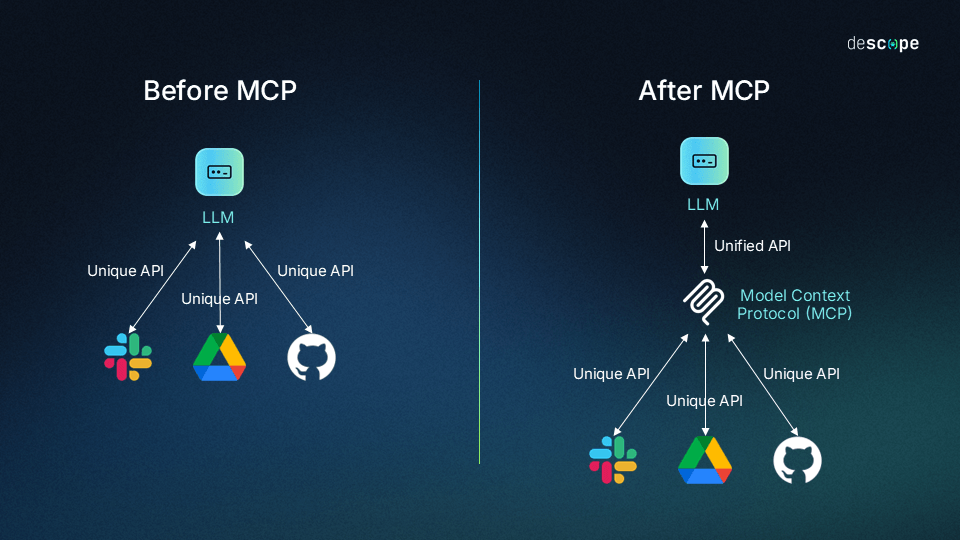
Serving tool definitions to LLMs from the MCP server (tool capabilities, data stores, and prompts)
instead of each client app having to define its own JSON tool schemas for each model it supports, the MCP server acts as a central registry that provides tool definitions, prompts, and resource descriptions to whatever agent or LLM client connects to it at runtime.
Without MCP (using a function call directly within an LLM)
- Define model-specific schemas: JSON descriptions of the function, acceptable parameters, and expected response format
- Implement handlers for the functions
- Create different implementations for each model you support (they have different tool tags in Claude vs ChatGPT etc)
Using MCP:
- You are not bound to the integrations that only ChatGPT or Claude support (using their tool calling)
- Ability to discover tools by the agent itself at runtime
- no need to build out json tool descriptions in each client app
- contribute to a universal format where any AI app can use any tool without custom integration code
 source: https://www.descope.com/learn/post/mcp
From a high level, this architecture is broken down into
- host (the process running the LLM, or the application itself)
- client (the tool used to connect to the MCP server. Uses JSON-RPC 2.0
- MCP server. Collection of prompts for both tools and resources. API's and databases
- communication (json rpc2)
Sequence Diagram Flow
 source: Claude
- Need recognition: Claude analyzes the question and recognizes it needs external, real-time information (not available during training)
- Tool selection: Claude identifies it needs MCP capability to fulfill the request.
- Permission request: The client could displays a permission prompt to a user
- Information exchange: Once approved, the client sends a request to the appropriate MCP server using the MCP protocol
- External processing: The MCP server processes the request (api call, db query etc)
- Results return in a standardized format.
- Context integration: Claude incorporates the response into context
- Response generation: Claude generates an up to date response
This should happen seamlessly, creating a streamlined experience where Claude can access live data / private / custom tools. ie: not from training data
client features
In addition to making use of context provided by servers, clients may provide several features to servers. These client features allow server authors to build richer interactions.
Feature Explanation Example
Sampling
| Description | Example |
|---|---|
| Sampling allows servers to request LLM completions through the client, enabling an agentic workflow. This approach puts the client in complete control of user permissions and security measures. | A server for booking travel may send a list of flights to an LLM and request that the LLM pick the best flight for the user. |
Roots
Roots allow clients to specify which directories servers should focus on, communicating intended scope through a coordination mechanism. A server for booking travel may be given access to a specific directory, from which it can read a user’s calendar.
Elicitation
Elicitation enables servers to request specific information from users during interactions, providing a structured way for servers to gather information on demand. A server booking travel may ask for the user’s preferences on airplane seats, room type or their contact number to finalise a booking.
Tooling
check out tooling here: descope
You can also make use of existing off the shelf MCP tools as references:
Serious Security Considerations
Always treat these tools as idiots that will delete you database / code by mistake, easily. Backup before using!!!
This is why is it vital to keep HUMANS IN THE LOOP Clients must request explicit permissions, and users must understand the implications